AI food Photoshop
Create premium
without a photographer
Create premium
- no photographer needed
Create premium
without a photographer
Create premium
- no photographer needed
Compose Mode

Original Dish
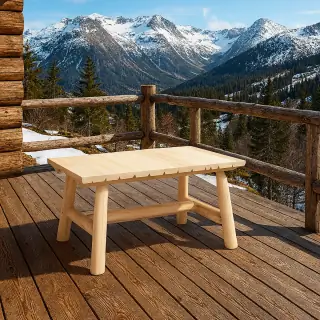
Original Restaurant
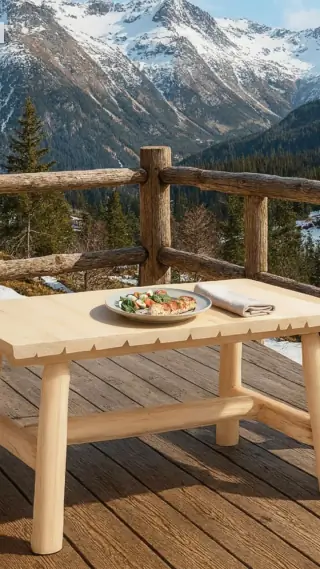
Composition
Create Mode
1 · Source
2 · Edited
Animate Mode
1 · Source image
2 · Short promo video
Create is for generating a new food image from scratch or editing a finished dish with prompt-led changes while keeping the core shot intact. Each run returns one final image based on your prompt and optional reference.
Example prompt: "Add lime slices on the plate and on the table."
Compose is Umami’s signature workflow: upload a real dish and a real restaurant scene, merge them into one natural final image. Use a prompt to add or change details.
Example prompt: "Place the dish naturally on the table and add a folded napkin."
Animate turns a required food reference image into a polished promo clip, with prompt-guided motion, 4K output options, and optional sound. Use the prompt to guide motion, camera feel, lighting, and mood.
Example prompt: "Someone is eating sushi."
Good for
Restaurants
•
Cafes
•
Ghost kitchens
•
Delivery brands
•
Food creators
•
Agencies
•
Hospitality teams
•
Restaurant groups
•
Restaurants
•
Cafes
•
Ghost kitchens
•
Delivery brands
•
Food creators
•
Agencies
•
Hospitality teams
•
Restaurant groups
Advantages
Ease
Ready visuals without a shoot
Versatility
Three modes: Create, Compose and Animate.
Speed
Quality
4K photos and videos
Features
Launch visuals faster
A new special should not wait for the next shoot day. Create launch-ready stills, compositions and clips while the campaign is still current.
Reduce shoot costs
Umami replaces shoots where they are no longer needed: menu updates, delivery visuals and seasonal tests.
Minimized workflow
Each mode is pre-configured. Just add a short prompt when needed and get ready-to-publish visuals without prompt-engineering complexity.
Built for food styling
It keeps the dish central, the scene believable and the motion appetizing, so the result feels like restaurant creative instead of generic AI output.
Why Umami
Umami?
Features
Umami
Plateit
FoodStage AI
FoodPhoto.ai
Dedicated Compose Mode
Upload a real dish and a real restaurant scene, then place them together naturally in one polished final image.
Prompt editing after composition
After the merge, refine styling, props, cleanup or scene details with a single prompt.
Separate Create Mode
Generate a new image from scratch or restyle a finished dish with prompt edits, like turning coffee into matcha.
Starts from your real dish
Use your actual food photo instead of inventing a different burger, pizza or dessert.
Starts from your real restaurant scene
Use the actual table, interior or restaurant photo instead of placing the dish into a generic generated space or comparable space.
Built-in video generation
Turn a finished frame into a promo video with 4K output options and optional sound inside the same product.
Dedicated Animate Mode
A separate video workflow for turning a still dish image or a text prompt into a short food promo clip without leaving the product.
Built for menu, delivery and ads
Designed for the actual formats restaurant teams publish and test every week.
Workflow
Step 01
Choose a mode
Decide whether you need a photo, a composition or a video.
Step 02
Add your assets
Describe it or upload the dish photo, the interior, or both.
Step 03
Get the final visual
No manual retouching, reshoots or waiting around.
Step 04
Publish right away
Use it in menus, delivery listings, on your website and on social media.
Our Gallery
See how Umami visuals perform See how Umami visuals perform
Example prompt: "Someone cuts this croissant with a knife."
Pricing
Fuel Your Creativity
Choose a plan that fits your workflow. Plans include credits for the workflows you use most.
Start Free Trial
Start with 3 free image credits for 1 day. Card verification is required. After the first day, this subscription automatically continues with the Starter plan ($10 / 30 image credits monthly). You can cancel anytime in Account Settings during the trial or after activation.
Create and Compose use image credits
Animate uses video credits

Usage calculator
Move the sliders - the calculator will show how many credits and how much budget you may need each month.
Subscription plan
Billing cycle
Yearly billing is available for Creator and Studio only.
Add-ons
One-time payment: 50 image credits for $25
0
One-time payment: 50 video credits for $25
0
One-time payment: 70 video credits for $35
0
One-time payment: 40 image credits for $20
0
6
This is the maximum credits available for this plan. Reduce outputs or choose a different plan.
Added 1 × 50 image credits add-on automatically for this demand.
4
Upgrade to Creator or Studio to unlock Compose.
This is the maximum credits available for this plan. Reduce outputs or choose a different plan.
Added 1 × 40 image credits add-on automatically for this demand.
2
Upgrade to Creator or Studio to unlock Animate.
This is the maximum credits available for this plan. Reduce outputs or choose a different plan.
Added 1 × 50 video credits add-on automatically for this demand.
Animate resolution used in this calculator.
Upgrade to Studio to unlock 4K video generation.
Animate sound used in this calculator.
Required image credits
14
6 × 1 image credit + 4 × 2 image credits
Required video credits
10
2 × 5 video credits
Available image credits
95
Plan + add-ons: 95 + 0
Available video credits
5
Plan + add-ons: 5 + 0
Selected package spend
$50
Creator (monthly) • No add-ons selected.
Coverage check
Image credits: 14 required • 95 total • Video credits: 10 required • 5 total (5 short)
Create × 1 image credit + Compose × 2 image credits + Animate × 5 video credits
Testimonials
"Umami has revolutionized the way our menu photography has been done. We have saved thousands of dollars in production fees while producing much better quality work."
Dima Ivanchenko
Executive Chef

"Mode «Compose» is absolutely amazing. It matches our dishes in any surrounding very well."
Vlad Jenkins
Marketing Director
"At last! AI that knows about food styling. Lighting and shading are perfect."
Emily Chen
Restaurant Owner
"After switching to Umami visuals, our conversion rate on delivery apps increased by 40%."
Olivia Wilson
Operations Manager
"It's truly remarkable how quickly we can iterate these days. We're talking about testing out new menu concepts in a matter of minutes. It is really useful app for businesses especially for pizzerias, now our pizza looks perfect 👌"
Lucas Gomez
Head Chef
Sasha Vasilieva
Bakery Owner






FAQ
FAQ
Quick answers about inputs, workflow, credits and what each mode is actually for.
Umami AI is an app that creates professional food photos and short promotional food videos with AI.
Menu images, delivery visuals, restaurant scenes, social ads, and short food videos.
Restaurants, cafes, ghost kitchens, delivery brands, food marketers, and food creators.
Create generates new images from scratch or edits finished dishes with a prompt. Compose, Umami’s signature mode, places your real dish into a restaurant scene and lets you refine details through a prompt. Animate turns a finished dish photo into a promo video with 4K support and optional sound.
Yes. Animate Mode turns a reference food image into a short promotional video using a motion prompt.
Yes. Umami is designed to start from normal restaurant inputs, including quick phone photos of the dish or the scene.
Create uses 1 credit for one generation. Compose uses 1 credit to produce five draft compositions, and after you select the best one, 1 more credit is used for the final Enhance step. In practice, a full Compose run usually costs 2 credits. Animate pricing depends on output: 1080 costs 5 video credits without sound or 10 with sound, while 4K costs 20 video credits.
Yes. Umami is built for commercial restaurant use, including menus, delivery listings, websites, social media and advertising.
Generate food visuals